
Create an IAM role, Make sure that AWS service is selected under Select type of trusted entity. For Choose a use case, choose EC2 under Common use cases, Choose Next: Permissions. In the list of policies, select CloudWatchAgentServerPolicy & create an IAM role.

Now attach an IAM role with EC2 Instance. Go to EC2 — Select Instance — Click on Action — Security — Modify IAM role
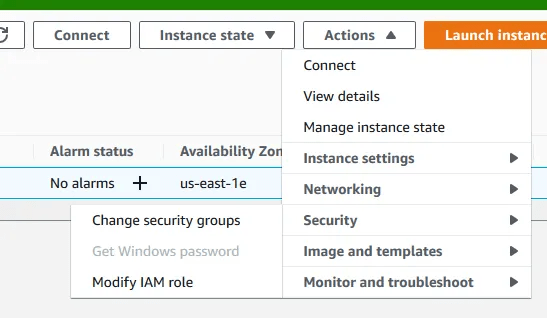
Choose create IAM role & save it.

Step 3: Download the CloudWatch Agent Package
wget https://s3.amazonaws.com/amazoncloudwatch-agent/ubuntu/amd64/latest/amazon-cloudwatch-agent.deb
Install the package:
dpkg -i -E ./amazon-cloudwatch-agent.deb
Update Packages & Install collectd:
apt-get update && apt-get install collectd
Step 4: Create the CloudWatch Agent Configuration File
/opt/aws/amazon-cloudwatch-agent/bin/amazon-cloudwatch-agent-config-wizard
We can check json file under /opt/aws/amazon-cloudwatch-agent/bin/config.json
Now check the status of CW agent.
/opt/aws/amazon-cloudwatch-agent/bin/amazon-cloudwatch-agent-ctl -m ec2 -a status
Status is stopped now, so start it & check status after that.
/opt/aws/amazon-cloudwatch-agent/bin/amazon-cloudwatch-agent-ctl -a fetch-config -m ec2 -s -c file:/opt/aws/amazon-cloudwatch-agent/bin/config.json
To stop the CloudWatch agent locally using the command line
sudo /opt/aws/amazon-cloudwatch-agent/bin/amazon-cloudwatch-agent-ctl -m ec2 -a stop
 Sandeep Palod